Optimizing SQL query for billions of records table – a powerful tips
For a table with billions of records, optimizing SQL query is crucial. The main problem with the query is that it applies functions (YEAR, MONTH, DATEFROMPARTS) to the ORDERDATE column within the GROUP BY clause. This forces the database to perform a calculation for every single row before it can group them, preventing the efficient use of an index on ORDERDATE.
-- The query
SELECT
   ss.SOLDTONBR,
   datefromparts(year(ORDERDATE),month(ORDERDATE),1) order_date
from ss
group by
   ss.SOLDTONBR,
   datefromparts(year(ORDERDATE),month(ORDERDATE),1)
How to optimize this query?
The Problem of optimizing SQL query: Preventing Index Usage
The query is not SARGable (Searchable Argument-able). This means the database engine can’t use an index to find the data it needs directly. Instead, it must perform a full table scan, reading all billion rows from the disk, calculating the first day of the month for each one, and then grouping the results. This is incredibly slow and resource-intensive.
Optimization Strategies
Create a Composite Index – The Biggest Win
Regardless of how you rewrite the query, the most important step is to have the right index. Since you are grouping by SOLDTONBR and then by a derivative of ORDERDATE, the ideal index would cover both columns.
CREATE INDEX IX_ss_SoldToNbr_OrderDate ON ss (SOLDTONBR, ORDERDATE);This index allows the database to quickly access the data pre-sorted by SOLDTONBR and ORDERDATE, making the grouping operation vastly more efficient. Optimizing SQL query.
Optimisation tips you can also find here: 15 Essential SQL Tips You Can’t Live Without
Column store indices for MS SQL Server you can find here
Use More Efficient Date Functions
Instead of combining YEAR and MONTH, use a single, more efficient function to truncate the date to the beginning of the month. The best function depends on your specific database system. These functions are often better optimized internally. Optimizing SQL query.
- SQL Server:SQL
-- Best for modern SQL Server SELECT ss.SOLDTONBR, DATETRUNC(month, ORDERDATE) AS order_date FROM ss GROUP BY ss.SOLDTONBR, DATETRUNC(month, ORDERDATE); - PostgreSQL / Redshift:SQL
SELECT ss.SOLDTONBR, DATE_TRUNC('month', ORDERDATE) AS order_date FROM ss GROUP BY ss.SOLDTONBR, DATE_TRUNC('month', ORDERDATE); - MySQL:SQL
SELECT ss.SOLDTONBR, DATE_FORMAT(ORDERDATE, '%Y-%m-01') AS order_date FROM ss GROUP BY ss.SOLDTONBR, order_date; -- MySQL allows using alias in GROUP BY - Oracle:SQL
SELECT ss.SOLDTONBR, TRUNC(ORDERDATE, 'MM') AS order_date FROM ss GROUP BY ss.SOLDTONBR, TRUNC(ORDERDATE, 'MM');
While better, these still apply a function to the column, which can limit performance. The index from step 1 is still what makes the biggest difference.
3. The Gold Standard: A Date Dimension Table
For very large tables (like yours), the best practice is to use a date dimension table. This is a static lookup table containing one row for every day over a long period (e.g., 100 years). It has pre-calculated columns for everything you might need: first day of the month, week of the year, quarter, etc.
Here you can see how to create a Date Dimension Table using recursive CTE: How Works Recursive CTE in SQL Server?
SET DATEFIRST  1,
    DATEFORMAT ymd,
    LANGUAGE   US_ENGLISH;

-- Define date range
DECLARE @StartDate  date = '20220101';
DECLARE @CutoffDate date = DATEADD(DAY, -1, DATEADD(YEAR, 5, @StartDate));

-- Recursive CTE to generate date dimension
WITH seq(n) AS
(
    SELECT 0
    UNION ALL
    SELECT n + 1
    FROM seq
    WHERE n < DATEDIFF(DAY, @StartDate, @CutoffDate)
),
DateDimension AS
(
    SELECT
        DATEADD(DAY, n, @StartDate) AS Date,
        DATENAME(WEEKDAY, DATEADD(DAY, n, @StartDate)) AS DayName,
        DATEPART(WEEKDAY, DATEADD(DAY, n, @StartDate)) AS DayOfWeek,
        DATEPART(DAY, DATEADD(DAY, n, @StartDate)) AS Day,
        DATEPART(MONTH, DATEADD(DAY, n, @StartDate)) AS Month,
        DATENAME(MONTH, DATEADD(DAY, n, @StartDate)) AS MonthName,
        DATEPART(YEAR, DATEADD(DAY, n, @StartDate)) AS Year,
        DATEPART(QUARTER, DATEADD(DAY, n, @StartDate)) AS Quarter,
        DATEPART(WEEK, DATEADD(DAY, n, @StartDate)) AS WeekOfYear,

        CASE
            WHEN DATEPART(WEEKDAY, DATEADD(DAY, n, @StartDate)) IN (1, 7) THEN 1
            ELSE 0
        END AS IsWeekend
    FROM seq

)
SELECT
    dd.*,
    k.WeekOfYear_fdt
FROM
    DateDimension dd
LEFT JOIN
    (
        SELECT
            Year,
            WeekOfYear,
            MIN(Date) as WeekOfYear_fdt
        FROM DateDimension
        GROUP BY Year, WeekOfYear
    ) AS k ON k.Year = dd.Year AND k.WeekOfYear = dd.WeekOfYear
ORDER BY
    Date
OPTION (MAXRECURSION 0);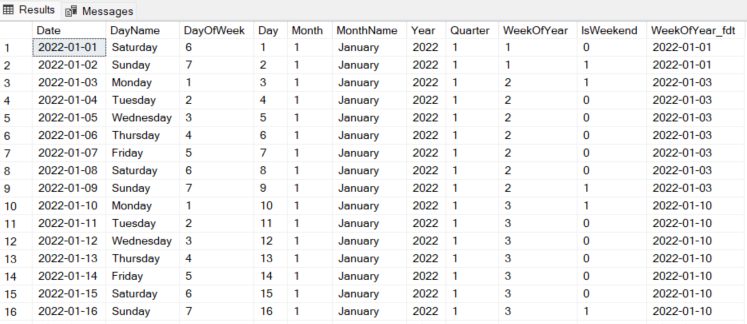
Example DimDate Table:
| DateKey | FullDate | FirstOfMonth | Year | MonthName | WeekOfYear |
| 20251012 | 2025-10-12 | 2025-10-01 | 2025 | October | 41 |
| 20251013 | 2025-10-13 | 2025-10-01 | 2025 | October | 42 |
| 20251014 | 2025-10-14 | 2025-10-01 | 2025 | October | 42 |
| … | … | … | … | … | … |
How to Use It:
You join your main table to DimDate. The expensive GROUP BY calculation is replaced with a fast join and a group on a pre-calculated column.
SQL. Optimizing SQL query.
SELECT
    ss.SOLDTONBR,
    d.FirstOfMonth AS order_date
FROM
    ss
INNER JOIN
    DimDate d ON ss.ORDERDATE = d.FullDate -- Assumes ORDERDATE has no time component
GROUP BY
    ss.SOLDTONBR,
    d.FirstOfMonth;
Why this is the most efficient:
- No on-the-fly calculations: The grouping is done on a column that is already calculated (
d.FirstOfMonth). - Index-friendly: The join
ss.ORDERDATE = d.FullDatecan use indexes on both columns for maximum speed. - Flexibility: It makes grouping by any other time period (week, quarter) trivial and just as fast.
Grouping by Week of the Year
To group by week, you can apply the same principles.
- Function-based (Less Efficient):Use a function like DATETRUNC(‘week’, ORDERDATE) or DATEPART(week, ORDERDATE).SQL
-- Example for PostgreSQL / SQL Server SELECT ss.SOLDTONBR, DATETRUNC(week, ORDERDATE) as order_week FROM ss GROUP BY ss.SOLDTONBR, DATETRUNC(week, ORDERDATE); - Date Dimension Table (Most Efficient):This is the ideal way. Just change the column in your GROUP BY clause.SQL
SELECT ss.SOLDTONBR, d.WeekOfYear, -- Or a column representing the first day of the week d.Year FROM ss INNER JOIN DimDate d ON ss.ORDERDATE = d.FullDate GROUP BY ss.SOLDTONBR, d.WeekOfYear, d.Year;
Summary of Recommendations
For a table with billions of records, follow these steps for maximum performance (Optimizing SQL query.):
- Immediately create a composite index:
CREATE INDEX IX_ss_SoldToNbr_OrderDate ON ss (SOLDTONBR, ORDERDATE); - For the ultimate solution, create and populate a Date Dimension table. Join to this table to perform your aggregations. This is the most scalable and flexible method.
- If you cannot create a dimension table, replace your
DATEFROMPARTS(YEAR(...), MONTH(...))logic with a more efficient, platform-specific function likeDATETRUNC(). Optimizing SQL query.