
How to Scrape a Website and Search Inside PDFs with Python
Ever found yourself on a webpage with dozens of PDF links, needing to find a specific piece of information buried in one of them? 😩 We will teach you how to scrape a website and search inside PDFs with Python. Manually downloading and searching each file is tedious, time-consuming, and prone to errors. What if you could automate the entire process with just a few lines of code?
In this tutorial, we’ll show you exactly how to do that. We’ll build a powerful yet simple Python script that automatically scans a webpage, finds all the PDF links, and searches for specific text inside each one. Using popular libraries like Requests, BeautifulSoup, and PyPDF, you’ll learn a practical skill that can save you hours of manual work. Let’s get started!
Python, Web Scraping, PDF, Automation, BeautifulSoup, PyPDF, requests, Data Extraction, Python Projects, Text Search
Scrape a Website
in the script we Find all links on the initial page. Filter for links that end with .pdf. For each PDF link: Download the PDF file into memory. Extract text from every page of the PDF. Search the extracted text for your search_string. And finally Report which PDF files contain the phrase. Scrape a Website
import requests
from bs4 import BeautifulSoup
from pypdf import PdfReader
import io

Scrape a Website
def find_linked_pdfs(url):
    """
    Scans a webpage for PDF links and searches for a string within each PDF.

    Args:
        url: The URL of the webpage to scan.
        search_string: The string to search for inside the PDFs.
    """
    print(f"Scanning {url} for PDF links...")
    try:
        # 1. Get the main page to find all links
        base_url_parts = requests.utils.urlparse(url)
        base_url = f"{base_url_parts.scheme}://{base_url_parts.netloc}"

        response = requests.get(url)
        response.raise_for_status()
        soup = BeautifulSoup(response.text, 'html.parser')

        pdf_links = [a['href'] \
          for a in soup.find_all('a', href=True) \
          if a['href'].endswith('.pdf')]

        if not pdf_links:
            print("No PDF links found on the page.")
            return

        print(f"Found {len(pdf_links)} PDF files. Now searching inside them...")

return pdf_linksHandling URLs: It constructs a full, absolute URL for each PDF, as many links on a page can be relative (e.g., /path/to/file.pdf). Scrape a Website. https://pypi.org/project/beautifulsoup4/
In-Memory Processing: Instead of saving each PDF to your disk, it uses io.BytesIO to treat the downloaded content as a file in your computer’s memory. This is faster and cleaner.
Text Extraction: The pypdf library’s PdfReader opens this in-memory file. The script then loops through each page, calls extract_text(), and combines the text from all pages.
Searching and Reporting: Finally, it performs a case-insensitive search on the extracted text and prints the URL of any PDF that contains your search term.
Search Inside PDF
def find_text_in_pdfs(pdf_links, search_string):

        # 2. Loop through each PDF link

        found_in_files = []
        for pdf_path in pdf_links:
            # Construct absolute URL if the link is relative
            if not pdf_path.startswith(('http://', 'https://')):
                pdf_url = f"{base_url}{pdf_path}"
            else:
                pdf_url = pdf_path

            try:
                # 3. Download the PDF content
                pdf_response = requests.get(pdf_url)
                pdf_response.raise_for_status()

                # Use an in-memory buffer to read the PDF
                pdf_file = io.BytesIO(pdf_response.content)
                reader = PdfReader(pdf_file)

                # 4. Extract text and search
                full_text = ""
                for page in reader.pages:
                    full_text += page.extract_text() or ""

                if search_string.lower() in full_text.lower():
                    print(f"✔️ Found '{search_string}' in: {pdf_url}")
                    found_in_files.append(pdf_url)

            except Exception as e:
                print(f"⚠️ Could not process {pdf_url}. Reason: {e}")

        if not found_in_files:
            print(f"\nSearch complete. The string '{search_string}' was not found in any of the PDFs.")

    except requests.exceptions.RequestException as e:
        print(f"An error occurred fetching the main URL: {e}")
x
if __name__ == "__main__":
    target_url = "https://www.umcs.pl/pl/plany-zajec,10795.htm"
    search_term = "programming"
    pdf_links = find_linked_pdfs(target_url)
    find_text_in_pdfs(pdf_links, search_string)
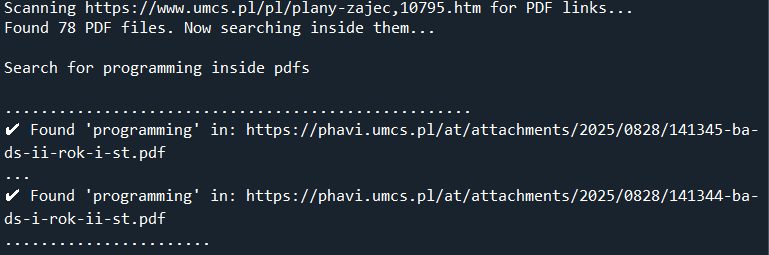
Wrapping Up and Next Steps
Congratulations! You’ve successfully built a powerful automation script that bridges the gap between web scraping and document analysis. By combining the strengths of Requests, BeautifulSoup, and PyPDF, you can now programmatically find information that was previously locked away inside PDF files on any website. This not only saves an incredible amount of time but also opens up new possibilities for data collection and analysis. Feel free to adapt the code for your own projects and take your web scraping skills to the next level. Scrape a Website.
The applications for this technique extend far beyond a single use case. Imagine using this script for academic research, automatically scanning university archives for papers mentioning a specific topic. You could adapt it for financial analysis by pulling keywords from dozens of quarterly earnings reports, or for legal work by searching through court filings for a particular case name. Job seekers could even use it to scan company websites for PDF job descriptions that contain key skills.
To perform a statistical analysis of the overall economy, you can leverage a variety of online resources, including government and intergovernmental data portals, as well as academic publications. These sources often provide data in structured formats like CSVs and APIs, but also in less-structured formats like HTML tables and PDFs, which can be parsed using Python libraries like Beautiful Soup and pypdf.
Government and Intergovernmental Data Sources
For raw, official economic data, these are your most reliable sources. They offer a wealth of information on everything from GDP and inflation to employment rates and international trade. Scrape a Website. Search Inside PDF
- Federal Reserve Economic Data (FRED): A fantastic resource from the St. Louis Fed, FRED offers over 800,000 economic time series from more than 100 sources. It’s a goldmine for anyone doing macroeconomic analysis.
- The World Bank Open Data: This portal provides comprehensive global development data, including indicators on economic policy, poverty, gender, and more, making it perfect for cross-country comparisons.
- Data.gov: The home of U.S. government open data, this site aggregates datasets from various federal agencies, including the Bureau of Economic Analysis (BEA) and the Bureau of Labor Statistics (BLS).
- United Nations Statistics Division (UNSD): The UNSD offers a wide array of international statistics, including the UNdata portal which provides free access to over 60 million statistical records from various UN agencies.
- The Bureau of Economic Analysis (BEA): The BEA produces some of the most critical U.S. economic statistics, such as GDP, personal income, and corporate profits.
You can read about Business analyst carrier path here
The core principle remains the same: automate the discovery of information, no matter the format. Search Inside PDF. Happy coding! 🚀