Semantic Search with Elasticsearch
Semantic search with Elasticsearch is must have for modern e-commerce. Elasticsearch is a powerful search engine, scalable data store, and vector database built on Apache Lucene. It’s optimized for speed and relevance on production-scale workloads. You can use Elasticsearch to index your product database and built beautiful Semantic search with Elasticsearch.
How AI is changing search behaviors
https://www.nngroup.com/articles/ai-changing-search-behaviors
Semantic search with Elasticsearch – intro
https://www.elastic.co/search-labs/blog/introduction-to-vector-search
Language model implementation
As the first we should initiate a language model and prepare product data for input. Semantic search with Elasticsearch require data indexing via vector transformer.
import pandas as pd
import numpy as np

# function to normalize vectors
def normalize_embedding(embedding):
    norm = np.linalg.norm(embedding)
    return embedding / norm if norm != 0 else embedding

# select products from sql database
def select_products():
    q = """
        SELECT
         [ProductId]
        ,[ProdIdx]
        ,[ProductName]
        FROM [DB_Products]
    """
    dfp = read_from_sql_server(q);
    return dfp

# import sentence transformers and initiate model
from sentence_transformers import SentenceTransformer
model = SentenceTransformer('all-MiniLM-L6-v2')
print(model)

import torch
device = torch.device('cuda' if torch.cuda.is_available() else 'cpu')
print(device)

model = model.to(device)
print(model)Data indexing for semantic search
Now we can index product data into Elasticsearch database (index). We will index product names as vectors and lexically. This allows hybrid search. Semantic search with Elasticsearch.
# initiate Elasticsearch client
from elasticsearch import Elasticsearch, helpers
es = Elasticsearch('http://localhost:9100')

# check es client
from pprint import pprint
pprint(es.info().body)

# ReCreate the index with dense_vector and text mappings
# step 1
es.indices.delete(index="prod_search_hybrid", ignore_unavailable=True)

# step 2 - mappings
es.indices.create(
    index="prod_search_hybrid",
    mappings={
        "properties": {
            "embedding": {
                "type": "dense_vector",
                "dims": 384,
                "index": True,
                "similarity": "cosine"
            },
            "prodct_name": {
                "type": "text"
            }
        }
    },
)

# list indices and number of documents indexed
def indices_list():
    indices = es.cat.indices(format='json')
    return [x['index'] for x in indices]
# -------------------
print(indices_list())
# ------------------------------

# Create documents for embedding
documents = []
for i, r in df_docs.iterrows():
    documents.append({
        'product_name': r['ProductName'][:256].lower(),
    })

print(f' Created table of {len(documents)} docs')

# Prepare bulk operations
from tqdm import tqdm                                         # for a prograss bar
operations = []
for document in tqdm(documents, total=len(documents)):
    operations.append({'index': {'_index': 'prod_search_hybrid'}})
    operations.append({
        **document,
        'embedding': get_embedding(document['product_name']), # vectors for semantic search
        'product_name': document['product_name']              # the text field for hybrid search
    })

# Bulk insert the data into Elasticsearch
response = es.bulk(operations=operations)
print(f' Records indexed: {len(response["items"])}')Hybrid search
For hybrid search we combine match and knn search inside a bool query. The _name field return what what part of the query has returned results. This allow to build hybride scoring. As you can see we vectorize query_h to query_vector using the same procedure get_embeding as we were using during indexing. Semantic search with Elasticsearch.
query_h = "anti-explosion device"

# Print the query vector for debugging
# query_vector = get_embedding(query_h)
# print("Query Vector:", query_vector)

response = es.search(
    index='prod_search_hybrid',
    body={
        "query": {
            "bool": {
                "should": [
                    {
                        "match": {
                            "product_name": {
                                "query": query_h,
                                "_name": "text_match"
                            }
                        }
                    },
                    {
                        "knn": {
                            "field": "embedding",
                            "query_vector":  query_vector,
                            "k": 10,
                            "num_candidates": 100,
                            "_name": "semantic_search"
                        }
                    }
                ]
            }
        }
        ,
        'size': 30
    }
)After that we can extract product names and scoring and build a list according to our intention. In here we separate products according to field _name and then build list of top 10 lexical match and semantic similarity. More about similarity measures you can read in post Measuring product similarity
# Extract product names, scores, and sources
products = [
    (hit["_source"]["product_name"], hit["_score"], hit.get("matched_queries", []))
    for hit in response["hits"]["hits"]
]

# Separate products into text_match and semantic_search groups
text_match_products = [product for product in products if "text_match" in product[2]]
semantic_search_products = [product for product in products if "semantic_search" in product[2]]

# Sort each group by score in descending order
sorted_text_match_products = sorted(text_match_products, key=lambda x: x[1], reverse=True)[:10]
sorted_semantic_search_products = sorted(semantic_search_products, key=lambda x: x[1], reverse=True)[:10]

# Print top 10 text_match products
print("\nTop 10 Text Match Products:")
for product in sorted_text_match_products:
    print(f"Product Name: {product[0]}, Score: {product[1]}")

# Print top 10 semantic_search products
print("\nTop 10 Semantic Search Products:")
for product in sorted_semantic_search_products:
print(f"Product Name: {product[0]}, Score: {product[1]}")Full-text search, also known as lexical search, is a technique for fast, efficient searching through text fields in documents. Documents and search queries are transformed to enable returning relevant results instead of simply exact term matches. Fields of type text are analyzed and indexed for full-text search.
You can combine full-text search with semantic search using vectors to build modern hybrid search applications. While vector search may require additional GPU resources, the full-text component remains cost-effective by leveraging existing CPU infrastructure.
Another example of vector indexing and sementic search you can find here: https://github.com/elastic/elasticsearch-labs/blob/main/notebooks/search/00-quick-start.ipynb
Vector search setup and performing hybrid search
https://www.elastic.co/search-labs/blog/vector-search-set-up-elasticsearch
https://www.elastic.co/search-labs/blog/hybrid-search-elasticsearch
Filtering. Semantic search with Elasticsearch
Filter context is mostly used for filtering structured data. For example, use filter context to answer questions like:
- Does this timestamp fall into the range 2015 to 2016?
- Is the status field set to “published”?
Filter context is in effect whenever a query clause is passed to a filter parameter, such as the filter or must_not parameters in a bool query. Learn more about filter context in the Elasticsearch docs.
Keyword Filtering
This is an example of adding a keyword filter to the query. The example retrieves the top books that are similar to “javascript books” based on their title vectors, and also Addison-Wesley as publisher. Semantic search with Elasticsearch.
response = client.search(
    index="book_index",
    knn={
        "field": "title_vector",
        "query_vector": model.encode("javascript books"),
        "k": 10,
        "num_candidates": 100,
        "filter": {"term": {"publisher.keyword": "addison-wesley"}},
    },
)

pprint(response)
Query and filter context
Relevance scores
By default, Elasticsearch sorts matching search results by relevance score, which measures how well each document matches a query. The relevance score is a positive floating point number, returned in the _score metadata field of the search API. The higher the _score, the more relevant the document. While each query type can calculate relevance scores differently, score calculation also depends on whether the query clause is run in a query or filter context.
Query context
In the query context, a query clause answers the question How well does this document match this query clause? Besides deciding whether or not the document matches, the query clause also calculates a relevance score in the _score metadata field. Query context is in effect whenever a query clause is passed to a query parameter, such as the query parameter in the search API. Semantic search with Elasticsearch
Filter context
A filter answers the binary question “Does this document match this query clause?”. The answer is simply “yes” or “no”. Filtering has several benefits:
- Simple binary logic: In a filter context, a query clause determines document matches based on a yes/no criterion, without score calculation.
- Performance: Because they don’t compute relevance scores, filters execute faster than queries.
- Caching: Elasticsearch automatically caches frequently used filters, speeding up subsequent search performance.
- Resource efficiency: Filters consume less CPU resources compared to full-text queries.
- Query combination: Filters can be combined with scored queries to refine result sets efficiently.
Filters are particularly effective for querying structured data and implementing “must have” criteria in complex searches.
Structured data refers to information that is highly organized and formatted in a predefined manner. In the context of Elasticsearch, this typically includes:
- Numeric fields (integers, floating-point numbers)
- Dates and timestamps
- Boolean values
- Keyword fields (exact match strings)
- Geo-points and geo-shapes
Unlike full-text fields, structured data has a consistent, predictable format, making it ideal for precise filtering operations. Semantic search with Elasticsearch.
Common filter applications include:
- Date range checks: for example is the
timestampfield between 2015 and 2016 - Specific field value checks: for example is the
statusfield equal to “published” or is theauthorfield equal to “John Doe”
Filter context applies when a query clause is passed to a filter parameter, such as:
filterormust_notparameters inboolqueriesfilterparameter inconstant_scorequeriesfilteraggregations
Filters optimize query performance and efficiency, especially for structured data queries and when combined with full-text searches.
GET /_search
{
  "query": {
    "bool": {
      "must": [
        { "match": { "title":   "Search"        }},
        { "match": { "content": "Elasticsearch" }}
      ],
      "filter": [
        { "term":  { "status": "published" }},
        { "range": { "publish_date": { "gte": "2015-01-01" }}}
      ]
    }
  }
}
Read more: Product Search and Product classification for E-commerce
Reciprocal rank fusion
Reciprocal rank fusion (RRF) is a method for combining multiple result sets with different relevance indicators into a single result set. RRF requires no tuning, and the different relevance indicators do not have to be related to each other to achieve high-quality results. Semantic search with Elasticsearch.
RRF uses the following formula to determine the score for ranking each document:
score = 0.0
for q in queries:
    if d in result(q):
        score += 1.0 / ( k + rank( result(q), d ) )
return score

# where
# k is a ranking constant
# q is a query in the set of queries
# d is a document in the result set of q
# result(q) is the result set of q
# rank( result(q), d ) is d's rank within the result(q) starting from 1
You can use RRF as part of a search to combine and rank documents using separate sets of top documents (result sets) from a combination of child retrievers using an RRF retriever. A minimum of two child retrievers is required for ranking.
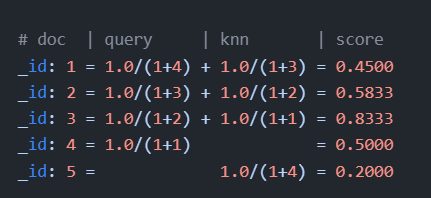
We rank the documents based on the RRF formula with a rank_window_size of 5 truncating the bottom 2 docs in our RRF result set with a size of 3. We end with _id: 3 as _rank: 1, _id: 2 as _rank: 2, and _id: 4 as _rank: 3. This ranking matches the result set from the original RRF search as expected.
In this example, we execute the knn and standard retrievers independently of each other. Then we use the rrf retriever to combine the results.
- First, we execute the kNN search specified by the
knnretriever to get its global top 50 results. - Second, we execute the query specified by the
standardretriever to get its global top 50 results. - Then, on a coordinating node, we combine the kNN search top documents with the query top documents and rank them based on the RRF formula using parameters from the
rrfretriever to get the combined top documents using the defaultsizeof10.
Note that if k from a knn search is larger than rank_window_size, the results are truncated to rank_window_size. If k is smaller than rank_window_size, the results are k size.
GET example-index/_search
{
    "retriever": {
        "rrf": {
            "retrievers": [
                {
                    "standard": {
                        "query": {
                            "term": {
                                "text": "shoes"
                            }
                        }
                    }
                },
                {
                    "knn": {
                        "field": "vector",
                        "query_vector": [1.25, 2, 3.5],
                        "k": 50,
                        "num_candidates": 100
                    }
                }
            ],
            "rank_window_size": 50,
            "rank_constant": 20
        }
    }
}