
Google Ads Conversion and GA4 Revenue Difference
Google Ads Conversion and GA4 Revenue Difference – It’s common and frustrating issue for digital marketers. Difference between Google Ads Total Conversion Value and Google Analytics GA4) CPC Revenue can really demolish your day. While a small discrepancy (10-20%) is often considered normal, a large difference signals a need for investigation. Why Google Ads Conversion Value and GA4 CPC Revenue Difference exists.
Attribution Models and Credit
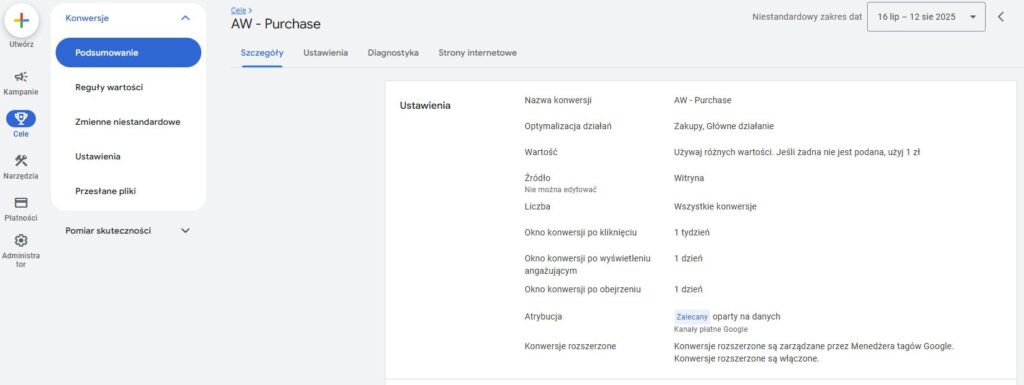
Google Ads Attribution: By default, Google Ads uses a data-driven attribution model, which gives credit to various touchpoints along the conversion path. By default ist is 30 days. It will take credit for a conversion as long as a user interacted with one of your ads within 30 days. You can defined shorter lookback window.
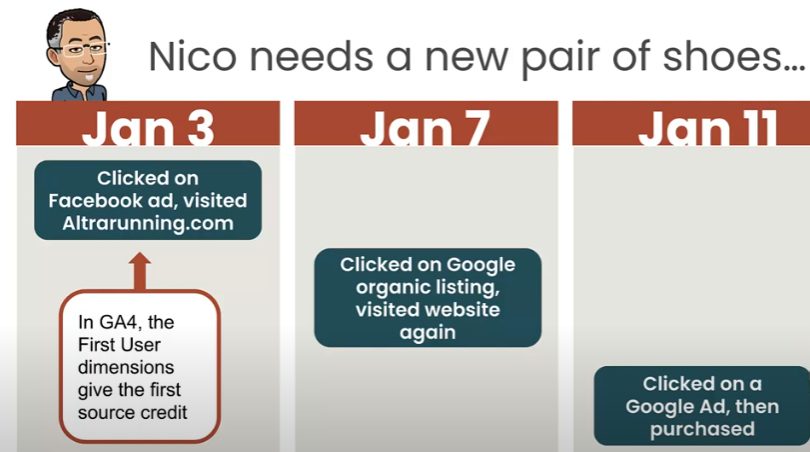
GA4 Attribution: GA4’s default is also data-driven, but it’s “cross-channel.” This means it considers all marketing channels (organic search, direct, social, email, etc.) in the customer journey, not just Google Ads. If a user clicks a Google ad, then later comes back to your site via organic search and converts, GA4’s data-driven model will distribute credit to both channels, while Google Ads will likely claim all or most of the conversion value.
Time-Based Reporting Google Ads Conversion and GA4 Revenue Difference
The way each platform logs a conversion can create a significant reporting gap, especially when analyzing recent data.
- Google Ads: Attributes a conversion to the date of the ad click or impression.
- GA4: Attributes a conversion to the date of the actual transaction or conversion event.
For example, if a user clicks a Google ad on September 20th but makes a purchase on October 5th, Google Ads will report the conversion value in September, while GA4 will report it in October. This “conversion lag” can cause large differences when comparing monthly or weekly reports. Google Ads Conversion and GA4 Revenue Difference.
Conversion Counting and Definitions
How you set up your conversion counting and conversion values can lead to different numbers. Especially important is conversion values for e-commerce purchase.
Conversion Counting: In Google Ads, you can choose to count a conversion “once” or “every” time it happens. For example, if a user submits a form multiple times, you might want to count it only once. However, for a purchase, you’d want to count every transaction. If these settings are not aligned between Google Ads and GA4, your numbers will not match.
Conversion Actions: If you have different conversion actions set up in Google Ads and GA4, or if they are not correctly linked, you will see a discrepancy. For example, if you track a “purchase” in GA4 but have a different conversion action for “leads” in Google Ads, the numbers will naturally be different.
Technical and User-Based Factors
These are often smaller but can add up to a substantial difference.
- Ad Blockers and User Consent: Some ad blockers and privacy settings can prevent GA4’s tracking code from firing, meaning a session and conversion might not be recorded in GA4. However, the Google Ads conversion tag is often less affected, so Google Ads may still report the conversion. Similarly, if a user opts out of tracking via a consent banner, GA4 may not receive the data.
- Quick Exits: A user may click a Google ad, be charged for the click, and then hit the back button before the GA4 tracking tag has a chance to load. Google Ads will count the click, but GA4 won’t record a session, leading to a discrepancy between clicks and sessions, and ultimately, conversions.
- Cross-Device Conversions: Google Ads uses modeled conversions to account for users who start their journey on one device and finish it on another. This can lead to a higher conversion count in Google Ads than in GA4, especially if Google Signals is not enabled in GA4.
- View-Through Conversions: Google Ads counts “view-through conversions,” which are conversions that happen after a user sees a display ad but doesn’t click on it. GA4 does not track these by default, which can cause Google Ads to report more conversions and higher conversion value.
What to Do About It
Align Your Attribution Models: Consider using the same attribution model in both platforms for a more direct comparison. While Google Ads defaults to data-driven, you can use the “Model Comparison” tool in GA4 to see how your data would look under a different model, like “Last Click.”
The Model Comparison report, also referred to as the Attribution models report, in Google Analytics 4 (GA4) is a tool that allows you to compare how different attribution models distribute credit for conversions. It helps you understand how various marketing channels, like paid search, social media, and organic search, contribute to a user’s conversion path. This is a crucial report for understanding the true value of your marketing efforts beyond just the last touchpoint.
The report lets you select a conversion event and then view how its value would be allocated to different channels under two different attribution models. You can then see a percentage change, which highlights which channels are being over or undervalued depending on the model you use.
Key Attribution Models to Compare
GA4 offers a few attribution models to choose from, with Data-driven being the default. Comparing this with other models is where the tool’s value really shines.
- Data-driven: This model uses machine learning to analyze all the touchpoints in a user’s journey, including both converting and non-converting paths. It then assigns credit based on the actual impact of each touchpoint. It’s considered the most accurate and sophisticated model.
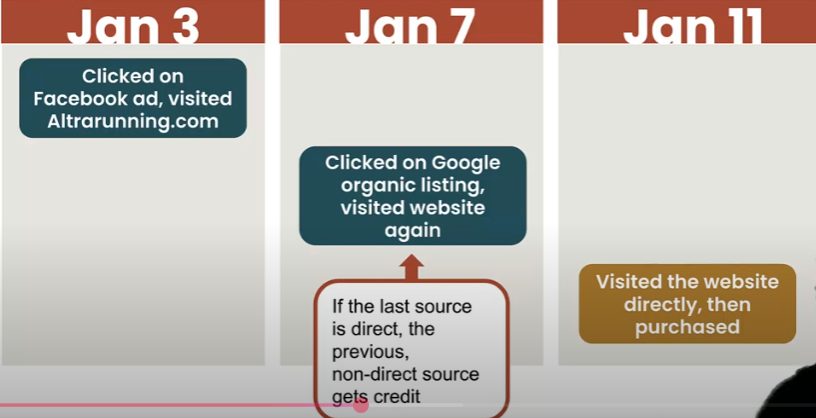
- Paid and organic last click: This is a rule-based model that gives 100% of the conversion credit to the last channel a user clicked on before converting, ignoring any direct traffic.
- Google paid channels last click: This model gives 100% of the credit to the last Google Ads click before a conversion. If there was no Google Ads click, it defaults to the “Paid and organic last click” model.
Why is this important?
Understanding how different attribution models impact your data is critical for making smart business decisions. For instance, a “last click” model might make your paid search campaigns look like they’re driving all your conversions, leading you to undervalue channels like social media or display ads that introduce users to your brand much earlier in their journey. By using the Model Comparison report, you can see how a channel’s value changes when you shift from a last-click to a data-driven model, which can lead to better budgeting and optimization.
The video below offers a tutorial on how to use the Model Comparison Tool to analyze your traffic channels and conversion data in Google Analytics. How to Use the Model Comparison Tool in Google Analytics to Compare Your Traffic Channels
Check Your Conversion Settings: Ensure that your conversion actions are correctly set up and linked, and that the counting method is consistent across both platforms.
Check Your Date Ranges: When comparing, make sure you’re using a long enough date range (e.g., a full month or longer) to account for any conversion lag.
Enable Auto-Tagging: Make sure auto-tagging is enabled in your Google Ads account so that GA4 can properly attribute traffic back to your campaigns.
Don’t Panic: It’s normal to have some level of discrepancy. The key is to understand why the differences exist and use both platforms for what they’re best at: Google Ads for optimizing your paid campaigns and GA4 for understanding the full, multi-channel customer journey.
Read more here